Showing posts with label windows. Show all posts

Friday, May 04, 2012

How I Got A Free Upgrade on SkyDrive

Friends, I wanted to tell you something good that happened with me yesterday...
I was browsing my SkyDrive account, and all of a sudden, I clicked on 'Manage Storage' button, I got was the same notorious Upgrade page, with the same notorious links.


But the new thing which happened was that there was a button of 'Free Upgrade' (mentioned in image) of my space from 7GB to 25GB...
Click To Enlarge


There was a saying that I am a loyal customer of them.. I don't know what do they mean by that, but probably that I am using SkyDrive efficiently... So, you all can try go there.. Maybe you are also a 'loyal customer'..


Manage Storage | Skydrive
Access Full Article...

Sunday, April 22, 2012

Save Your Personal Files from Access By Others Using Steganography

I have already posted a method to hide files in PC using Protected Folder. But what if your friend or anyone else asks (or forces) you to tell the password, so, here is a better technique to hide your files without anyone’s knowing.\


So, here is a new method called Steganography. Steganography is the hiding of a secret message within an ordinary message and the extraction of it at its destination. Steganography takes cryptography a step farther by hiding an encrypted message so that no one suspects it exists. Ideally, anyone scanning your data will fail to know it contains encrypted data.


So, here is a software to do that, Our Secret enables you to hide and encrypt files within other files (called carrier files) such as pictures or sound files. This allows you to encrypt sensitive information, while at the same time hiding it in a file that will not look suspicious, so nobody even knows that there is any encrypted information.


The carrier files are fully functional and identical to the original files (except for the size), so if the message was hidden in a picture file, the picture can still be viewed normally. The program gives you options to hide a text message, or any files that you want. You can specify a password to extract the hidden files.


PS: They give you a installer file, but I am giving you a portable one!!.. So, if you have any problems contact using comments.


Download Our Secret Portable
| MediaFire | SkyDrive |


| Via SecureKit.net |
Access Full Article...

Sunday, April 01, 2012

Recover Lost Windows or Microsoft Office Keys With Produkey

Sometimes we are in a hassle, when we want to know the Windows or Microsoft Office product key, when we need it... So, if you lost them, there is a utility for you.

ProduKey is a small utility that displays the ProductID and the CD-Key of Microsoft Office (Microsoft Office 2003, Microsoft Office 2007), Windows (Including Windows 7 and Windows Vista), Exchange Server, and SQL Server installed on your computer. You can view this information for your current running operating system, or for another operating system/computer - by using command-line options. This utility can be useful if you lost the product key of your Windows/Office, and you want to reinstall it on your computer.


Supported Products List

  • Microsoft Windows 98/ME
  • Microsoft Windows 2000
  • Microsoft Windows NT
  • Microsoft Windows XP
  • Microsoft Windows Vista
  • Microsoft Windows Server 2003
  • Microsoft Windows 7
  • Microsoft Office 2000 (Only ProductID is displayed)
  • Microsoft Office 2003
  • Microsoft Office 2007
  • Microsoft Office 2010
  • Microsoft SQL Server 2000
  • Microsoft SQL Server 2005
  • Microsoft Exchange Server 2000
  • Microsoft Exchange Server 2003

Using ProduKey

ProduKey doesn't requite any installation process or additional DLLs. In order to start using it, simply extract the files to any folder you like, and then run the executable file - produkey.exe 

The main window of ProduKey displays the list of Windows, Office, and SQL Server products installed on your system. For each product, the "Product ID" and "Product Key" are displayed.


Access Full Article...

Saturday, March 31, 2012

Enable Custom Login Screen In Windows 7

Hey, I am back again as a full-time blogger...


Anyways, there is a new trick here to get custom logon screen for Windows 7...
So, here are the steps:-:


1. Press Windows Key + R to launch Run. Type REGEDIT and hit enter.

2. Now navigate to,

HKEY_LOCAL_MACHINE\SOFTWARE\Microsoft\Windows\CurrentVersion\Authentication\LogonUI\Background
3. Change value of OEMBackground to 1.


or


Alternatively you can download the Registry file from here.Extract the file and double-click on the file to enable this feature (Alternative method: right-click, select Merge).

4. Now navigate to C:\Windows\System32\oobe, create folder “info”, double click it and create another new folder “backgrounds”.


5. Now place your desired picture inside logon file into C:\Windows\System32\oobe\info\backgrounds.


6. Rename the file to backgrounddefault.jpg. (Please NOTE: Images must be less than 256kb in size).

7. Press Windows Key + L to view your customized Logon Screen. Else Reboot your Windows to apply changes.


That’s it ....
Have any queries, Comment below..


Via TechPraveen

Access Full Article...

Monday, January 09, 2012

A Review: Acer Aspire S5

Acer unveiled the world's thinnest laptop computer as an array of "ultrabook" rivals prepared to debut this week at the Consumer Electronics Show in Las Vegas. 

The Taiwan-based computer titan will begin shipping Acer Aspire 5 models in the second quarter of this year, with prices to be disclosed in coming weeks. 

"That S5 is quite significant," analyst Tim Bajarin of Creative Strategies said after the Acer press event. 

"It looks like the thinnest and lightest, and it sets the bar for the rest of the ultrabook vendors," he continued. 

The Aspire S5 has a 34-cm (13.3-inch) screen and is 15 mm at its thickest point. The ultrabook weighs slightly less than 1.35 kg (three pounds). 

"We are committed to evolving this technology," said Acer chief executive J.T. Wang. "By the second quarter of this year we will have four models of ultrabook and more to come." 

Ultrabooks powered by Windows 8 will be released by Acer after Microsoft releases the new version of its computer operating system later this year, according to Wang. 

He estimated that ultrabooks would make up at least 35 per cent of the Acer product line by the end of this year. 

Since Aspire S5 is Windows based it is not likely to be a direct challenge to MacBook Air laptops, which have been winning converts to the sleek machines powered by Apple software, according to Bajarin. 

"The real battle is not with Apple, it is with all the other vendors coming out with Windows ultrabooks," Bajarin said. 

"Apple will still do great with MacBook Air, but in the Windows world it is great news that five years after Apple set the tone the industry is finally getting something equal," he continued. 

Acer also announced plans to launch a free service that will let users of its computers store video, photos, music, and documents in the internet "cloud" and access files from any Windows 8 or Android software powered gadgets. 

"We believe Microsoft will take care of Windows devices; Google will take care of Android devices, and Acer will take care of in between," Wang said. 

"We will make Windows work very well with Android and other platforms too." 

Bajarin described Aspire S5 as the first viable Windows equivalent of popular MacBook Air laptops built by California-based Apple. 

Acer Cloud appeared to be a Windows version of the Apple's freshly-launched iCloud service that lets people access their content from iPads, iPhones, iPods, and Macintosh computers, according to the analyst.
Access Full Article...

Sunday, September 18, 2011

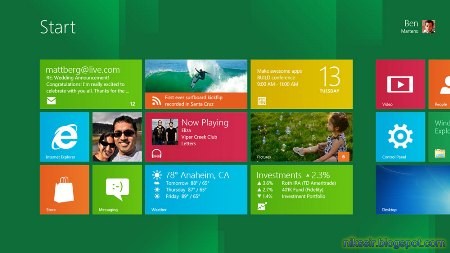
Windows 8 Developer Preview Launched!!..


Hey, I am back with some interesting news...

Already known fro the title that Microsoft launches its brand- new, fascinating 'Windows 8 Developer Preview'. The main features of this new version of Windows OS is the user interface, which has been highly redesigned keeping in mind optimization based on touch screen usage as well as mice and keyboard usage. It is having various graphical customizations which we saw in Windows 7. The new METRO UI has been included, something we saw in Windows Phone 7.
With this version, Microsoft has introduced a new start screen like that of the Windows Phone 7.


It has an option to switch between customized desktop and regular desktop by selecting the desktop tile. The windows 8 user interface has been highly developed on HTML5 and Java Script platforms. In this version, applications run on full screen resolution, but with the added feature of running two windows parallel using the swap tool. The various new applications demoed on this version are the stock tracking application, weather application and RSS feed applications, etc. This new version is designed primarily for screen resolutions 16:9 with 1366 x 768 with the ability to display various windows applications.
This new version of Windows OS will be using OEM version activation 3.0 while that used in earlier Windows version was OEM version 2.1. The main advantage of OEM 3.0 is that it makes things less easy to "crack."

A new additional feature of Windows 8 is the lock screen option which shows only the date and time and keeps the screen locked. This new version of OS will also include the Hyper V Virtualization Tool, but not available for the client machines initially. Systems should have a 64 bit processor for 64 bit Windows 8 OS and a minimum RAM of 4 GB to support the Hyper V Virtualization Tool.

The Hyper V Tool also requires a Second Level Address Translation (SLAT) which aids in managing memory of the system. Many of Intel’s AMD processors nowadays come with this feature.

The Windows 8 Version OS reduces the boot time for the system, as it loads the kernel memory into secondary storage or hard disk during the shutdown and reloads it during startup. The Windows 8 has system requirements similar to that of windows 7, including for a 32 bit system a RAM requirement of minimum 1 GB along with x86 processor with 1 GHz speed and minimum free memory space of 16 GB. While for a 64 bit operating system of windows 8 beta version the system must have the minimum configuration of: a 64 bits x86 processor with a minimum speed of 2GHz, a minimum RAM of 2 GB and free memory space of 20GB. The developer preview version of Windows 8 beta download is available now.

People who are interested in getting the flavor of the new version of Windows 8 can download the designer preview version of windows 8 Developer Preview. Along with that, a Windows 8 Transformation Pack is also available for different versions of Windows. Users interested can easily get Windows 8 Beta download and also may opt for the Windows 8 Transformation Pack.
Download the Windows Developer Preview
Access Full Article...

Sunday, September 04, 2011

Writing The Indian Rupee Symbol

Hello, Do you know how to write the famous Indian Rupee Symbol...
Isn't it good?
So, Foradian designed a rupee symbol for all of us to use...

HOW TO INSTALL:
To install it, Just double click the EXE file...

HOW TO USE:
To use it, just go to any word processor software and select this font from there. Now press the key above the TAB button (Key left to 1), and BOOOM! Its there.
Click To Enlarge

 And if you are bored of typing the same symbol again, then there is a RUPI FORADIAN...
Download RUPI FORADIAN Here
When the caps lock is on, It will type 26 different types of Rupee Symbol. Just Like This--
Click To Enlarge

HOW TO INSTALL:
Just Right-click the .ttf file and Select "INSTALL" button...

 HOW TO USE:
To use it, Just turn the caps lock on and type any of the alphabet.
so, thats the way to enter Rupee symbol to your text.

I will be back soon with more tricks. Till then Enjoy!! 
Access Full Article...

About The Author

Nikhil Jain is a prolific tech-blog writer for 2 years and is also completing his matriculation as a school student... He writes for his passion about tech-problems, how-to, new softwares & is also an expert in cracking softwares...
You can meet him on:
Google+
TwitterFacebook